Google Android TodoList MVVM Architecture Analysis
These few days I planned to write an Android program, but after setting up the project, I felt overwhelmed and realized that as someone who pursues ultimate code aesthetics, I should first figure out the current mainstream Android program structure before diving in.
After browsing CSDN, as a beginner I learned that there are two relatively mature architectural patterns in the market: MVP and MVVM. After careful consideration, I chose MVVM architecture as the structure for my first Android program.
So I followed the trail, (clues), and finally discovered that Android officials had long ago published their understanding of MVVM architecture on GitHub (GitHub link: https://github.com/android/architecture-samples).
Overall Architecture
Let’s first look at the overall structure of this program (we won’t focus on Test code here):
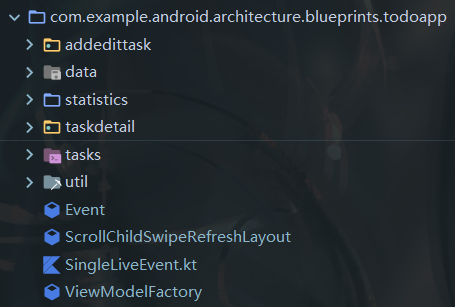
We can find that Android officials have divided the entire program into several parts:
-
data - package related to data processing
-
util - various custom utility classes
-
tasks, taskdetail, statistics, addedittask - various packages divided by functionality containing ViewModel and Activity
-
ViewModelFactory - ViewModel factory
-
ScrollChildSwipeRefreshLayout - custom component
-
SingleLiveEvent - This is quite strange, it has all comments inside. Here’s Google’s explanation for this class:
Looking for the SingleLiveEvent class? We are now using the Event class.
-
Event - Event-based encapsulation for data
Data Package Analysis
Actually, everything else is easy to understand, but the arrangement in the data package needs some analysis:
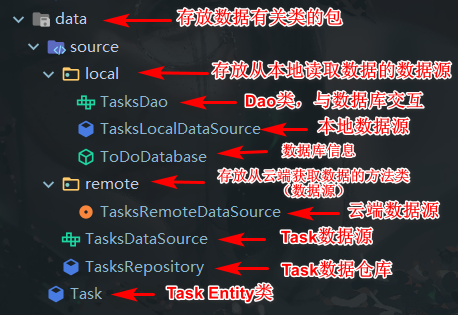
We can find that for a piece of data, its lifecycle can be analyzed according to the following flowchart:

With this, the analysis of Google’s official MVVM architecture is pretty much complete. Learning from books feels incomplete in the end; to truly understand, one must practice personally. Time to put it into practice (escaping