Maven Project Directory Management
Recently I’ve been trying to write projects with Maven, but unfortunately my skills aren’t good enough. I got stuck at the beginning by the Maven project directory arrangement.

Let me first introduce the situation. My project will be divided into several modules.
It’s roughly like this:
- project
	- module 1
	- module 2
	- module 3
And after thinking about it carefully, this problem can actually be divided into several small problems:
- How to name the project’s groupId and artifactId.
- The relationship between child Maven projects and parent Maven projects.
Without further ado, let’s get to the point.
How to Name Project’s groupId and artifactId
First, what we need to know is that groupId and artifactId here actually represent the project’s coordinates.
For example,
<groupId>org.apache.maven.plugins</groupId>
<artifactId>maven-compiler-plugin</artifactId>
These two lines can actually help us locate this project. It will be in the folder org/apache/maven/plugins/maven-compiler-plugin/.
So actually our problem is easily solved. For example, if I want to create a project named proj under the domain aiinirii.xyz.
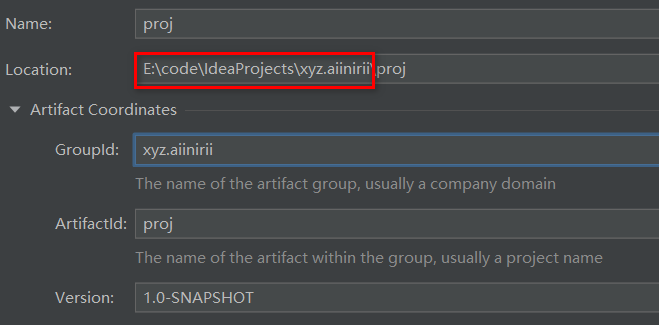
Note that Location here actually has no relationship with GroupId. It’s actually just the storage path for source code. After the Maven project is installed, it will be directly loaded into the local Maven repository under the directory xyz/aiinirii/proj. As long as it doesn’t conflict with other coordinates, it’s fine.
Relationship Between Child Maven Projects and Parent Maven Projects
After clarifying how to name projects, let me introduce what to do if, like me, there are parent-child dependency relationships between multiple projects?
First, we need to create a parent project. For example, set groupId and artifactId respectively as:
<groupId>xyz.aiinirii</groupId>
<artifactId>learn</artifactId>
This parent project will have several child projects. Here I create a new project named spring as an example:
<parent>
    <artifactId>learn</artifactId>
    <groupId>xyz.aiinirii</groupId>
    <version>1.0-SNAPSHOT</version>
</parent>
<modelVersion>4.0.0</modelVersion>

<groupId>xyz.aiinirii.learn</groupId>
<artifactId>spring</artifactId>
After creating this child project, you need to change the parent project’s pom.xml to:
<groupId>xyz.aiinirii</groupId>
<artifactId>learn</artifactId>
<version>1.0-SNAPSHOT</version>
<modules>
    <module>spring</module>
</modules>
As you can see, the relationship between the two has been established. After the Maven software is deployed, the newly created project named spring will become a child project under the parent project learn’s directory based on its groupId.
The relationship between them is that packages introduced in the parent project don’t need to be reconfigured in the child project. We can find that this method can ensure the consistency of the environment of various child projects under the same parent project, while also facilitating management.
Summary
- The path after the project is packaged (groupId) uses the reverse domain name method.
- artifactId and the project name will ultimately be placed under the groupId path.
- Using multi-module development can unifiedly manage the Maven project environment.