Problems Encountered When Implementing Transparent Status Bar
Problem (Solution at the end of the article)
<!-- file inner.xml -->

<?xml version="1.0" encoding="utf-8"?>
<RelativeLayout xmlns:android="http://schemas.android.com/apk/res/android"
    android:id="@+id/innerLayout"
    android:layout_width="match_parent"
    android:layout_height="530dp"
    android:fitsSystemWindows="true"
    android:orientation="vertical">
	...
</RelativeLayout>
<!-- file outer.xml -->

<?xml version="1.0" encoding="utf-8"?>
<ScrollView xmlns:android="http://schemas.android.com/apk/res/android"
    android:id="@+id/outerLayout"
    android:layout_width="match_parent"
    android:layout_height="match_parent"
    android:overScrollMode="never"
    android:scrollbars="none"
    android:visibility="invisible"
    android:fitsSystemWindows="true">

    <LinearLayout
        android:layout_width="match_parent"
        android:layout_height="wrap_content"
        android:orientation="vertical"
        android:fitsSystemWindows="true">

        <include layout="@layout/inner" />
    </LinearLayout>

</ScrollView>
// file activity.kt

class Activity : AppCompatActivity() {

    override fun onCreate(savedInstanceState: Bundle?) {
        ...
        nowLayout.setBackgroundResource(ImageId)
        ...
    }
}
<!-- file AndroidManifest.xml -->

<?xml version="1.0" encoding="utf-8"?>
<manifest xmlns:android="http://schemas.android.com/apk/res/android"
    package="xyz.aiinirii.xxx">

    <application
        android:name=".xxxApplication"
        android:allowBackup="true"
        android:icon="@mipmap/ic_launcher"
        android:label="@string/app_name"
        android:roundIcon="@mipmap/ic_launcher_round"
        android:supportsRtl="true"
        android:theme="@style/AppTheme">
		...
        <activity android:name=".Activity" android:theme="@style/ActivityTheme"/>
		...
    </application>

</manifest>
<!-- file styles.xml -->

<resources>

	<style name="AppTheme" parent="Theme.AppCompat.Light.NoActionBar">
        <!-- Customize your theme here. -->
        <item name="colorPrimary">@color/colorPrimary</item>
        <item name="colorPrimaryDark">@color/colorPrimaryDark</item>
        <item name="colorAccent">@color/colorAccent</item>
    </style>

    <style name="ActivityTheme" parent="AppTheme">
        <item name="android:statusBarColor">@android:color/transparent</item>
    </style>

</resources>
Above are several related files. Theoretically, with the settings above, the status bar should be transparent, but in practice, this is what happens:

As you can see, the status bar above is white. I’m not sure where the problem is yet. Next, I plan to do some experiments.
Experiments
- Changed background to static XML setting, i.e., adding
android:background="@color/colorPrimary", found it didn’t help. - Speculated that it was because the view that needs the transparent box attribute has
android:layout_height="530dp"fixed. Changed tomatch_parentbut still no use. - Speculated that it was caused by the
<include>tag, so I added an image above the<include>tag and setandroid:fitsSystemWindows="true", found the problem still exists. - Speculated that
<ScrollView>tag doesn’t support transparent mode, but actually it’s not…
The Problem
Finally found where the problem is. After checking all theinformation (information), here’s the summary:
-
First, about the
android:fitsSystemWindowsattribute. I misunderstood it before. For a component, if this value is set totrue, it will avoid the system component. The specific avoidance method is adding padding. Below, experiments are conducted by changing thefitsSystemWindowsfield of the BeijingTextViewcomponent.-
fitsSystemWindows = false:
-
fitsSystemWindows = true
-
-
If you want to solve the above problem, there are two methods:
-
<item name="android:windowTranslucentNavigation">true</item>This is my favorite method. Its effect picture is as follows: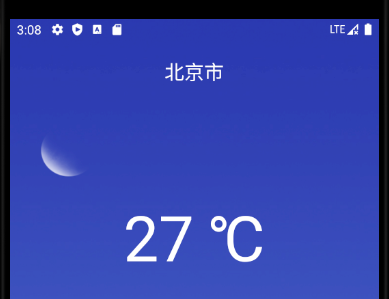
-
<item name="android:windowTranslucentStatus">true</item>This corresponds to the semi-transparent effect:
-