透明状态栏实现过程中遇到的问题
问题(解决办法在文章末尾)
<!-- file inner.xml -->

<?xml version="1.0" encoding="utf-8"?>
<RelativeLayout xmlns:android="http://schemas.android.com/apk/res/android"
    android:id="@+id/innerLayout"
    android:layout_width="match_parent"
    android:layout_height="530dp"
    android:fitsSystemWindows="true"
    android:orientation="vertical">
  ...
</RelativeLayout>
<!-- file outer.xml -->

<?xml version="1.0" encoding="utf-8"?>
<ScrollView xmlns:android="http://schemas.android.com/apk/res/android"
    android:id="@+id/outerLayout"
    android:layout_width="match_parent"
    android:layout_height="match_parent"
    android:overScrollMode="never"
    android:scrollbars="none"
    android:visibility="invisible"
    android:fitsSystemWindows="true">

    <LinearLayout
        android:layout_width="match_parent"
        android:layout_height="wrap_content"
        android:orientation="vertical"
        android:fitsSystemWindows="true">

        <include layout="@layout/inner" />
    </LinearLayout>

</ScrollView>
// file activity.kt

class Activity : AppCompatActivity() {

    override fun onCreate(savedInstanceState: Bundle?) {
        ...
        nowLayout.setBackgroundResource(ImageId)
        ...
    }
}
<!-- file AndroidManifest.xml -->

<?xml version="1.0" encoding="utf-8"?>
<manifest xmlns:android="http://schemas.android.com/apk/res/android"
    package="xyz.aiinirii.xxx">

    <application
        android:name=".xxxApplication"
        android:allowBackup="true"
        android:icon="@mipmap/ic_launcher"
        android:label="@string/app_name"
        android:roundIcon="@mipmap/ic_launcher_round"
        android:supportsRtl="true"
        android:theme="@style/AppTheme">
    ...
        <activity android:name=".Activity" android:theme="@style/ActivityTheme"/>
    ...
    </application>

</manifest>
<!-- file styles.xml -->

<resources>

  <style name="AppTheme" parent="Theme.AppCompat.Light.NoActionBar">
        <!-- Customize your theme here. -->
        <item name="colorPrimary">@color/colorPrimary</item>
        <item name="colorPrimaryDark">@color/colorPrimaryDark</item>
        <item name="colorAccent">@color/colorAccent</item>
    </style>

    <style name="ActivityTheme" parent="AppTheme">
        <item name="android:statusBarColor">@android:color/transparent</item>
    </style>

</resources>
上面放出来的是几个相关的文件,理论上按照上面这样设定,是可以实现状态栏的透明的,但是事实上,在实际操作时是这样的效果:

可以看到,上面的状态栏是白色的,暂时还不知道问题出在那里,接下来打算做几个实验。
实验
- 将background改为xml内静态设置,即加入
android:background="@color/colorPrimary"字段,发现并无用。 - 猜测是因为需要设置透明框属性的view的
android:layout_height="530dp"被定死出的问题,改为match_parent之后依然无用。 - 猜测是因为
<include>标签导致的问题,于是在<include>标签上方加入了一张图片并设置android:fitsSystemWindows="true",发现问题依然存在。 - 猜测是
<ScrollView>标签不支持透明模式,事实上并不是。。。
问题所在
终于找到问题所在了,在查遍资料之后在这里整理一下:
-
首先是有关
android:fitsSystemWindows这个属性,是我之前理解错了。对于一个组件来说,如果让这个值等于true的话,那么就会避开系统组件,具体避开方式为增加padding,下面靠更改北京市TextView组件的fitsSystemWindows字段来进行试验。-
fitsSystemWindows = false:
-
fitsSystemWindows = true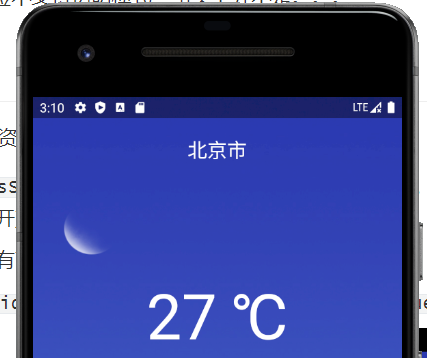
-
-
如果要解决上面的问题,有两个办法:
-
<item name="android:windowTranslucentNavigation">true</item>这个办法我最喜欢,它的效果图是这样的: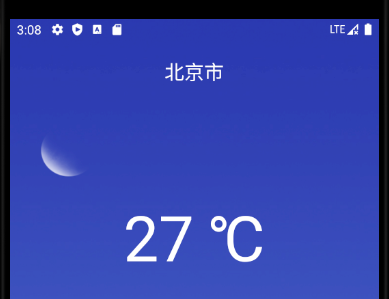
-
<item name="android:windowTranslucentStatus">true</item>这个对应半透明的效果:
-